
GreenCast Connect by Syngenta
SpiioWeather
4.24.00 Reviews
- Version
- 1.4.3
- Installs
- 10.00K
- Age Rating
- Everyone
Screenshots
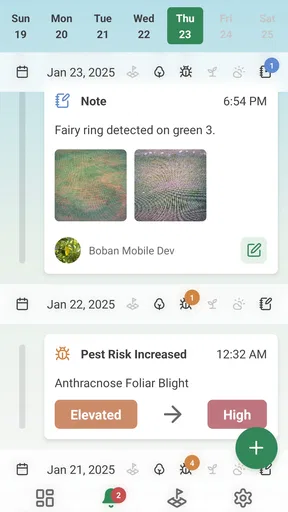
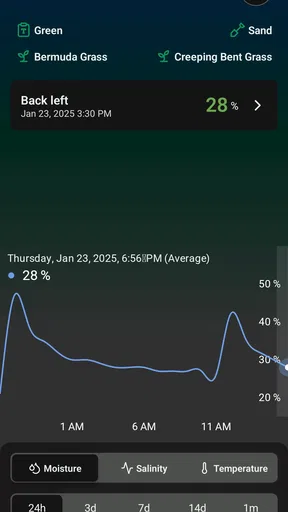
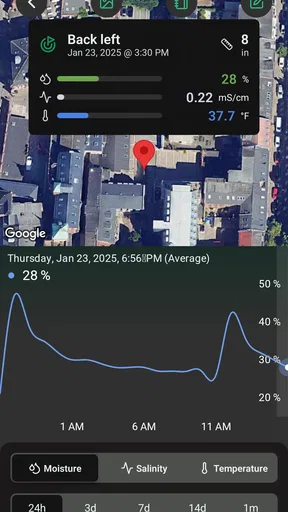
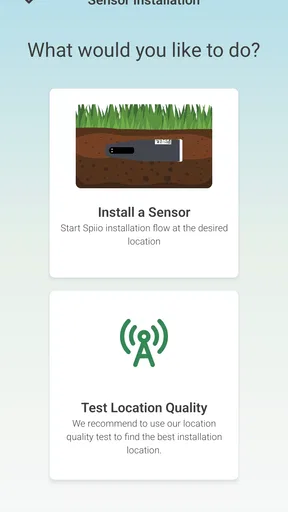
Our Review of GreenCast Connect by Syngenta
 Analysis by Appyee
I approached GreenCast Connect as a practical weather app for people who care about turf rather than simply wanting a quick look at the sky. Its focus is digital turf agronomy, so the useful question is not only whether rain is coming, but how weather information can support everyday decisions around maintaining green spaces. That gives it a more specialized purpose than a general forecast app, while also making its value depend heavily on who is using it and what decisions they need to make.
Developed by Spiio, the app is free and available to everyone from a content-rating perspective. It runs on Android devices using version 7.0 or later, which makes it accessible on many older phones as well as newer models. The current version is 1.4.2. I found that combination important because a turf-focused tool is often used outdoors, where users may prefer keeping an older, dedicated work phone instead of taking a premium handset onto a wet course, sports field, or garden site.
How I built a useful daily workflow around it
My first recommendation is to treat GreenCast Connect as part of a routine, not as an app to open randomly whenever the weather feels uncertain. A sensible baseline is to check it before planning work on turf, then check again when conditions are changing or when a decision has a real cost attached to it. That habit makes the information more useful because it connects the forecast with an action rather than turning it into passive scrolling.
For example, imagine preparing a sports field in the morning. The important decision may be whether to carry out routine work now, postpone it, or divide the job into smaller stages. A weather-focused turf app can help frame that decision, but it does not remove the need to inspect the surface itself. I would still walk the area, look for standing water, feel how soft the ground is, and consider recent maintenance. GreenCast Connect works best as a planning companion alongside that physical check.
The same approach applies to a home lawn. If I am deciding whether to spend time on mowing, feeding, or another maintenance task, I would use the app to establish a weather-aware plan and then adjust it based on the lawn’s actual condition. This is one of the most useful ways to think about the product: it can help me avoid treating every day as identical, but it should not encourage blind trust in a screen.
That distinction separates a specialist tool from a typical weather app. A general forecast is often designed around personal activities such as commuting or choosing clothing. GreenCast Connect is more relevant when weather affects turf work, scheduling, and the condition of a managed green surface. If your only need is knowing whether to take an umbrella, a conventional weather service will probably feel quicker and more complete.
I also found it helpful to decide in advance what information matters for a particular task. Someone managing a large area may be thinking about timing, consistency, and avoiding wasted labor. A homeowner may simply want a better sense of when outdoor lawn care fits into the week. The app becomes easier to use when I define that purpose before opening it, rather than trying to interpret every available detail equally.
Settings that deserve attention before regular use
With a specialized app, the first useful adjustment is not necessarily a technical option. It is making sure the app is being used in the right context for the place and turf area I care about. I would review the location-related setup carefully and make sure the selected area reflects the site I am actually managing. A forecast that represents the wrong place can create more confidence than value.
This matters especially for turf because conditions can differ over short distances. A nearby general forecast may not match an exposed field, a sheltered garden, or a site affected by local drainage and shade. GreenCast Connect should therefore support a repeatable location habit: use the same relevant site when planning, and avoid casually switching between locations without noticing.
I would also review notification behavior instead of allowing every alert to compete for attention. Weather information is most helpful when it arrives in time for a decision. Too many interruptions can make the app feel noisy, while too few reminders may cause me to miss a useful planning window. The right balance depends on whether I am checking a private lawn occasionally or coordinating work that affects other people.
Another practical setting habit is to keep the app current. The version available is 1.4.2, and using the current release is generally sensible when an app is part of a regular workflow. I would update it during a convenient moment rather than immediately before an important outdoor task, because any app can behave differently after an update and I prefer to verify my routine first.
The age and device requirements are also worth considering. Since Android 7.0 or later is supported, GreenCast Connect can suit users who do not have the newest phone. That is useful for work environments where devices may be shared or kept for a long time. At the same time, an older phone may have a slower experience than a modern one, so I would test the app on the actual device used outdoors instead of assuming that compatibility guarantees comfort.
I would not configure the app in isolation from the rest of my maintenance process. A good setup includes a simple note about what I intend to do, a consistent time for checking conditions, and a clear rule for when I will delay work. This is not a hidden feature; it is a user-created habit that makes the app more reliable in practice. The forecast can inform the routine, but the routine is what turns information into a decision.
Faster patterns for people who check conditions repeatedly
Experienced users usually gain speed by reducing unnecessary decisions. Rather than opening GreenCast Connect and starting from scratch each time, I would use a fixed sequence: confirm the site, review the relevant forecast information, compare it with the planned task, and record the decision if other people need to know about it. Repeating that sequence makes it easier to notice meaningful changes.
A useful shortcut is to separate “planning checks” from “go or no-go checks.” A planning check can happen earlier, when I am arranging the week. A go or no-go check happens closer to the task, when current conditions matter more. Mixing those two purposes can lead to premature decisions. GreenCast Connect is more valuable when I understand whether I am looking for broad scheduling guidance or a final confirmation before going outside.
Another efficient pattern is to check before preparing equipment, not after. If the weather outlook makes a job questionable, I can avoid spending time loading tools or organizing staff before deciding whether the task is sensible. This is a small change, but it is one of the clearest practical benefits of using a turf-oriented weather workflow.
For teams, consistency matters more than individual cleverness. I would encourage everyone involved to use the same location and the same checking sequence, then communicate the decision in plain language. The app itself should not become a substitute for communication. A manager may interpret conditions one way, while a worker on the field notices something different. Combining the digital view with the person on site produces a better result.
For a homeowner, the faster pattern is simpler. I might check the app while planning weekend work, then make a final decision after looking at the lawn. If the surface is already saturated, I would not force the task merely because the forecast appears acceptable. If conditions seem suitable, I would still choose a time that fits the rest of the day rather than treating the app as a command.
One non-obvious trade-off is that a specialist app can improve discipline while adding another step. If I already use a general weather app, calendar, and notes, GreenCast Connect may feel like extra work unless turf decisions are important enough to justify it. The benefit appears when the app helps prevent a missed maintenance window, an unnecessary visit, or work performed under poor conditions. For casual users, that payoff may be too small.
Where the specialist approach reaches its limits
GreenCast Connect’s main limitation is also the reason it exists: it is more focused than a broad weather app. I would not expect it to replace every weather tool on my phone. If I need a wide range of everyday information for travel, commuting, or general outdoor plans, a mainstream forecast service may be more convenient. GreenCast Connect makes more sense when turf management is the center of the decision.
I would also avoid assuming that weather guidance can diagnose turf problems. A weak lawn, disease concern, drainage issue, or irrigation problem may involve soil, grass type, shade, traffic, and maintenance history. Weather is one part of that picture. The app can help me plan around conditions, but it should not be treated as a complete agronomy consultation.
Another limit is human interpretation. A forecast can suggest a favorable or unfavorable window, but the best choice may change because of the site itself. A shaded section may remain wet longer than an exposed section. A heavily used field may need a different threshold from a decorative lawn. The more varied the site, the more important it becomes to combine the app with local observation.
The modest public footprint is also relevant when setting expectations. GreenCast Connect has an average rating of 4.0 from around 36 ratings, with four written reviews, and it has passed 10 thousand installs. I read that as enough interest to show that the concept has found an audience, but not as a reason to assume that every turf professional will find it indispensable. The smaller review base means I would personally test it against my own workflow before making it central to a large operation.
Its free price removes the financial barrier to trying it, which I appreciate. Still, “free” does not mean there is no cost in attention or process changes. If the app requires me to maintain an additional habit without improving decisions, I would return to a simpler tool. The right test is practical: after using it for several planned tasks, can I point to clearer scheduling, fewer wasted preparations, or better communication?
Users who need highly specialized operational records, detailed team coordination, or a complete maintenance management system may also need another solution alongside it. I would not choose GreenCast Connect as the sole platform for every administrative part of turf care. Its strength is the weather-aware layer, not replacing all the other work involved in running a site.
What mastery looks like in everyday use
For me, becoming comfortable with GreenCast Connect means learning when to consult it and when to stop consulting it. The best workflow is not checking constantly. It is checking at meaningful points, using the same site and routine, then pairing the result with direct observation. That keeps the app in a useful supporting role rather than allowing it to dominate the decision.
I would begin with one clearly defined area and one recurring task. After a few cycles, I could decide whether the information is helping me schedule work more confidently. This focused trial is better than trying to apply the app to every lawn, field, and weather question at once. It also makes weaknesses easier to identify, such as a location that does not represent the site well or a notification pattern that is too distracting.
The app is especially appealing to people who manage turf regularly and want weather to be part of a repeatable planning process. It can also suit a careful homeowner who wants more structure than a quick glance at a generic forecast provides. I would be less enthusiastic about recommending it to someone who rarely maintains grass, only wants general daily weather, or expects a weather app to make agronomic decisions automatically.
My final view is positive but deliberately practical. GreenCast Connect by Spiio is a focused free weather app that makes the most sense when outdoor turf work has real consequences. Its value comes from combining a relevant forecast view with consistent habits: check the correct site, separate early planning from final confirmation, prepare equipment only after making a sensible decision, and verify what the ground is telling you.
The strongest reason to try it is not that it promises to replace ordinary weather apps, but that it encourages a more turf-aware way of using weather information. I would recommend installing it if you manage lawns, fields, or other green spaces and are willing to build it into a routine. I would skip it if your needs are purely general-weather related. Used with realistic expectations, it is a useful specialist companion rather than an all-purpose replacement for observation, experience, or broader forecasting tools.
Privacy and Permissions
See what permissions an app requests and how it handles your data.
- Location
- precise location (GPS and network-based)
- Photos/Media/Files
- read the contents of your USB storage, modify or delete the contents of your USB storage
- Storage
- read the contents of your USB storage, modify or delete the contents of your USB storage
- Camera
- take pictures and videos
- Microphone
- record audio
- Wi-Fi connection information
- view Wi-Fi connections
- Other
- view network connections, full network access, run at startup, control vibration, prevent device from sleeping, Google Play license check
Verdict
Strengths of GreenCast Connect by Syngenta
- Provides localized weather data for more informed crop decisions.
- Helps monitor conditions relevant to disease and pest risk.
- Useful planning tool for spraying, irrigation, and fieldwork.
- Designed with agricultural users and farming workflows in mind.
- Can support more efficient use of water and crop treatments.
Limitations of GreenCast Connect by Syngenta
- Accuracy depends on the availability of local weather stations.
- Some features may require a compatible GreenCast account or service.
- The agricultural terminology may feel complex for casual users.
- Coverage and recommendations can vary by region and crop type.
- Requires reliable internet access for current forecasts and updates.
Similar Picks in This Category
View All
Weather - By Xiaomi
Xiaomi Inc.4.1

Weather & Radar Forecast
WetterOnline4.8

Weather
OneLouder Apps4.6

AccuWeather: Weather Radar
AccuWeather3.6

The Weather Channel - Radar
The Weather Channel4.6

1Weather Forecasts & Radar
OneLouder Apps4.3
Frequently Asked Questions
What is GreenCast Connect by Syngenta used for?
GreenCast Connect is a digital crop-management and agronomy tool from Syngenta designed to help growers and agricultural professionals make more informed field decisions. It can bring together weather information, crop observations, agronomic insights, and field-related data in one place. The exact features available may depend on your country, crop, account type, and the Syngenta services connected to the application.
Who can use GreenCast Connect, and is an account required?
The application is primarily intended for farmers, agronomists, crop advisers, distributors, and other professionals involved in agricultural production. Some information may be visible without signing in, but the main planning, field-management, or personalized features generally require registration and an active account. Availability can vary by region, so users should check whether the app is supported by their local Syngenta organization before downloading.
Does GreenCast Connect provide reliable weather and crop recommendations?
GreenCast Connect can be useful for planning field activities because it may combine localized weather data with agronomic information and crop-management tools. However, forecasts and recommendations should not be treated as guarantees. Weather conditions can change quickly, and results may depend on the accuracy of field data, location settings, and regional support. Always confirm important spray, irrigation, or treatment decisions with local guidance and product labels.
Can I use GreenCast Connect without an internet connection?
The app may require an internet connection for signing in, synchronizing field information, receiving updated forecasts, and accessing cloud-based recommendations or account services. Certain previously loaded information could remain available temporarily, but offline functionality should not be assumed for every feature. If you work in areas with limited coverage, open and synchronize the app before entering the field and verify that essential data is available.
Is GreenCast Connect free to download and safe for agricultural data?
GreenCast Connect may be available to download at no initial cost, although access to particular services, programs, or connected Syngenta tools could require eligibility, registration, or a commercial relationship. Before using it, review the current store listing, terms, and privacy policy for your region. Because the app can involve farm, location, or operational information, use a secure account and keep the application updated.
